Vagrant.configure(“2”) do |config|
# The most common configuration options are documented and commented below.
# For a complete reference, please see the online documentation at
# https://docs.vagrantup.com.
config.vm.define “clustercontrol” do |clustercontrol|
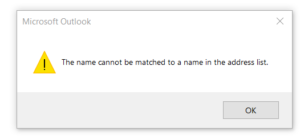
if you received this error. you need to update your outlook and reboot your computer. i have encountered this issue for few days with exchange 2013 and Microsoft outlook 2016 . configuring email as exchange.
i used this outlook update https://www.microsoft.com/en-us/download/confirmation.aspx?id=54546
yum install ea4-experimental
yum install ea-php56-php-memcache
yum install ea-php56-php-memcached
yum install ea-memcached

That should fix the issue. i have tried it and fixed my issue.
Reference

https://forums.cpanel.net/threads/installing-memcache-and-memcached-with-easyapache4.566261/
3) Go the section titled “Format-specific options” and change the dropdown for “Database system or older MySQL server to maximize output compatibility with:” from NONE to MYSQL40.
4) Scroll to the bottom and click “GO”.
I’m not certain if doing this causes any data loss, however in the one time I’ve tried it I did not notice any. Neither did anyone who responded in the forums linked to above.